

Conversion tracking tells you what happens after someone clicks your ad. It tells you whether that person has made a purchase, filled out a form, called your business, or completed any other action that you care about because without it, you are spending money on ads with no way of knowing what is actually working.
In this blog, you will learn about how to set it up correctly on Google Ads and Meta Ads and how to fix common tracking problems, and a lot more. By the end, you will know exactly how you can track each and every action that matters to your business.
Why Conversion Tracking Is the Foundation of Every Performance Marketing Campaign
When you think of every data-driven marketing strategy, it always starts with accurate data, and accurate data starts with proper setup.
Most businesses run Google Ads and Meta Ads campaigns; they spend their budget and look at both platforms’ dashboards to judge the performance, but if the tracking is broken or missing, those dashboards will show incomplete or even misleading numbers, and when you make a decision on bad data, it leads to bad results.
It fixes this because it connects your ad spends directly to real business outcomes, and when it works correctly, you will know exactly which campaigns, which ads, and which audiences are driving results. This is what makes performance marketing genuinely data-driven. Every decision is based on real numbers, not guesses.
What Is Conversion Tracking and Why It Matters
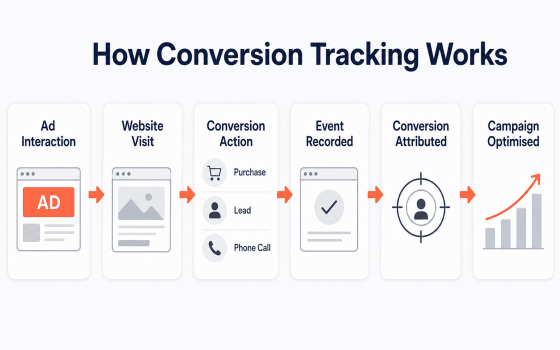
It helps you measure all the actions that people take after they click on your ad, and these actions could be a purchase, a sign-up, a download, or a phone call.
You can think of it as a receipt. When you go to a shop to buy something, the shop gets proof of the sale. It’s the same for conversion tracking; it gives you the same proof but for online ads. Here is why it matters:
- Shows which ads are bringing in actual customers.
- Helps you spend your ad budget where it works best.
- Lets you make marketing decisions based on real data.
- Helps you improve your performance marketing strategy over time.
Without proper tracking, you cannot tell if your ads are working. You might keep spending money on ads that bring clicks but no real results.
Google Ads Conversion Tracking: How to Set It Up Correctly
What Google Ads Conversion Tracking Measures
It records actions that happen on your website, app, or phone after someone clicks your Google Ad. These are common conversions tracked in Google Ads, which include:
- Form submissions and lead inquiries
- Online purchases and transactions
- Phone calls from ads or from your website
- App downloads and in-app actions
- Key page visits such as thank-you pages
Setting Up Conversion Tracking in Google Ads
To learn how to set this up in Google Ads, you should follow these basic steps:
- First you should go to your Google Ads account and open the Goals section.
- Choose the type of conversion you want to track, such as a purchase or a form submission.
- You should create a conversion action and get the tracking tag.
- Once you are done getting the tracking tag. Add this tag to your website using Google Tag Manager because this tool lets you add tracking codes without touching your website’s code directly.
- You must test the tag to confirm it is working correctly.
This process is one of the important key parts of any setup, and once it is live, Google Ads will start showing you the real conversion data in your reports.
How to Fix Conversion Tracking Issues in Google Ads
Sometimes it stops working or shows wrong numbers. Here are some common fixes, which include:
- You must check whether the tracking tag is installed on the correct page or not, especially the thank you page after a purchase.
- Always make sure that Google Tag Manager is publishing the latest version of your tags.
- Don’t forget to confirm that the cookies are not blocked by browser settings.
- Review if the duplicate tags are causing double counting.
If you notice sudden drops in conversions, these are usually the first places to check.
Meta Ads Conversion Tracking: How to Set It Up Correctly
What Meta Ads Conversion Tracking Measures
It is the actions people take on your website after they click on your Facebook or Instagram ads. The Meta Pixel is the primary tool for this. These are the common conversions that are tracked through Meta:
- Purchases and add-to-cart events
- Lead form submissions
- Page views and content views
- Initiating checkout
- Registration completions
How to Set Up Meta Pixel Conversion Tracking
The Meta Pixel is a small piece of code that tracks visitor actions on your website. Here is how to track Meta Ads conversions using it:
- You should create a Pixel inside Meta Events Manager.
- Add the Pixel code to your website, ideally through Google Tag Manager, if you want easier management.
- Set up specific events, like Purchase or Lead, so that Meta knows which actions to count.
- Last but not least, test the Pixel using Meta’s built-in testing tool.
Once it is active, the Meta Pixel will send data back to your ads dashboard, which will show which campaigns are driving results.
Understanding Conversion API
Browser privacy settings and ad blockers can stop the Meta Pixel from tracking every action, and this is where the Conversion API helps. It sends data directly from your website’s server to Meta, instead of relying only on the browser. When you use Meta Pixel and the Conversion API together, it gives you more accurate and reliable tracking.
Google Ads vs. Meta Ads Conversion Tracking
Many businesses run both platforms, so it helps to understand the difference between Google Ads and Meta Ads.
- Google Ads conversion tracking focuses on search intent. It tracks users who are actively searching for something.
- Meta Ads conversion tracking focuses on interest and behavior. It tracks users who see your ad while browsing.
- Google Ads uses a conversion tag placed through Google Tag Manager.
- Meta Ads uses the Meta Pixel and Conversion API together.
Both platforms serve different purposes, and when you track both correctly, it gives you a complete picture of your performance marketing campaigns.
If you feel setting up and managing tracking across multiple platforms can feel overwhelming, then this is the exact kind of work a dedicated team can make easy for you. DI Infotech’s performance marketing services help businesses build a reliable performance marketing plan, set up accurate tracking, and turn data into real growth. So if you want expert help in creating a data-driven marketing strategy instead of just guessing what will work and what will not, then getting expert help is a good place to start.
Conversion Tracking Tools You Can Use
Besides the built-in tools from Google and Meta, there are several tools that can make the process easier:
- Google Tag Manager helps you manage all your tracking tags in one place without editing website code.
- Google Analytics shows deeper insights into user behavior after they get converted.
- Meta Pixel helps you track your website actions, and it feeds data back to Meta for better campaign optimization.
- Meta Events Manager helps you monitor and troubleshoot Pixel and Conversion API data.
- Conversion API is basically a server-side tracking that improves metadata accuracy beyond what the pixel alone can capture.
- Google Tag Assistant is a Chrome extension for testing and verifying Google tags.
- Meta Pixel Helper is a Chrome extension for testing and verifying Meta Pixel installation.
- UTM parameters is a simple tags that are added to URLs to track where your traffic comes from.
Using the right combination of tools can make your setup stronger and easier to manage over time.
Common Conversion Tracking Issues and How to Fix Them
Even well-set-up tracking can break over time. Here are the most common issues and how to fix them:
Google Ads Tracking Problems
- Missing tag on the confirmation page. Check if the conversion tag is placed on the thank you page that loads after a purchase or form fill.
- Old tag versions. Make sure Google Tag Manager is publishing the latest version of your tags.
- Blocked cookies. Some browsers block third-party cookies by default, which can lower reported conversions.
- Duplicate tags. Having the same tag fire twice can double-count conversions and give you wrong numbers.
Meta Ads Tracking Problems
- Pixel not firing. Use Meta’s testing tool to confirm the Pixel is active on the right pages.
- Missing events. If you did not set up an event like Purchase or Lead, Meta will not count that action.
- iOS privacy limits. Apple’s privacy settings can block some Pixel data, which is why pairing it with the Conversion API is important.
- Delayed data. Meta Ads data sometimes takes a few hours to fully update, so avoid judging results too quickly.
Conclusion
Conversion tracking helps you understand what really happens after someone clicks your ad. It shows you which campaigns bring real results, so you can spend your budget wisely. Setting up both the platforms correctly gives you accurate data to guide your decisions. Combined with tools like Google Tag Manager and Conversion API, you get a clear and reliable view of your ad performance. If you want help setting up accurate tracking or building a stronger performance marketing plan. Visit DI Infotech, and our performance marketing team will be ready to guide you.
Explore our full performance marketing services here: DI Infotech Performance Marketing Agency
Frequently Asked Questions (FAQs)
What is conversion tracking in simple words?
It shows you what happens after someone clicks your ad, such as a purchase or a form fill. It tells you if your ad actually worked.
Do I need both Google Tag Manager and Meta Pixel?
Yes. Google Tag Manager helps you manage tracking tags for both platforms, while the Meta Pixel tracks specific actions for your Meta Ads campaigns.
Why is my conversion tracking not showing correct numbers?
This usually happens due to missing tags, blocked cookies, or duplicate tracking codes. Checking your Google Tag Manager setup often solves the issue.
What is the difference between Meta Pixel and Conversion API?
Meta Pixel tracks actions through the browser, while the Conversion API sends data directly from your server. Using both together improves tracking accuracy.
How often should I check my conversion tracking setup?
It is a good habit to review your tracking setup monthly, especially after making website changes, to make sure everything is still working correctly.
Also read:
What Is Performance Marketing? A Complete Guide for Businesses
How to Calculate ROAS: Formula, Examples & 7 Ways to Improve It in 2026
Why Your Paid Ads Aren’t Converting: 10 Problems That Waste Ad Budget
0 Comments